Databases
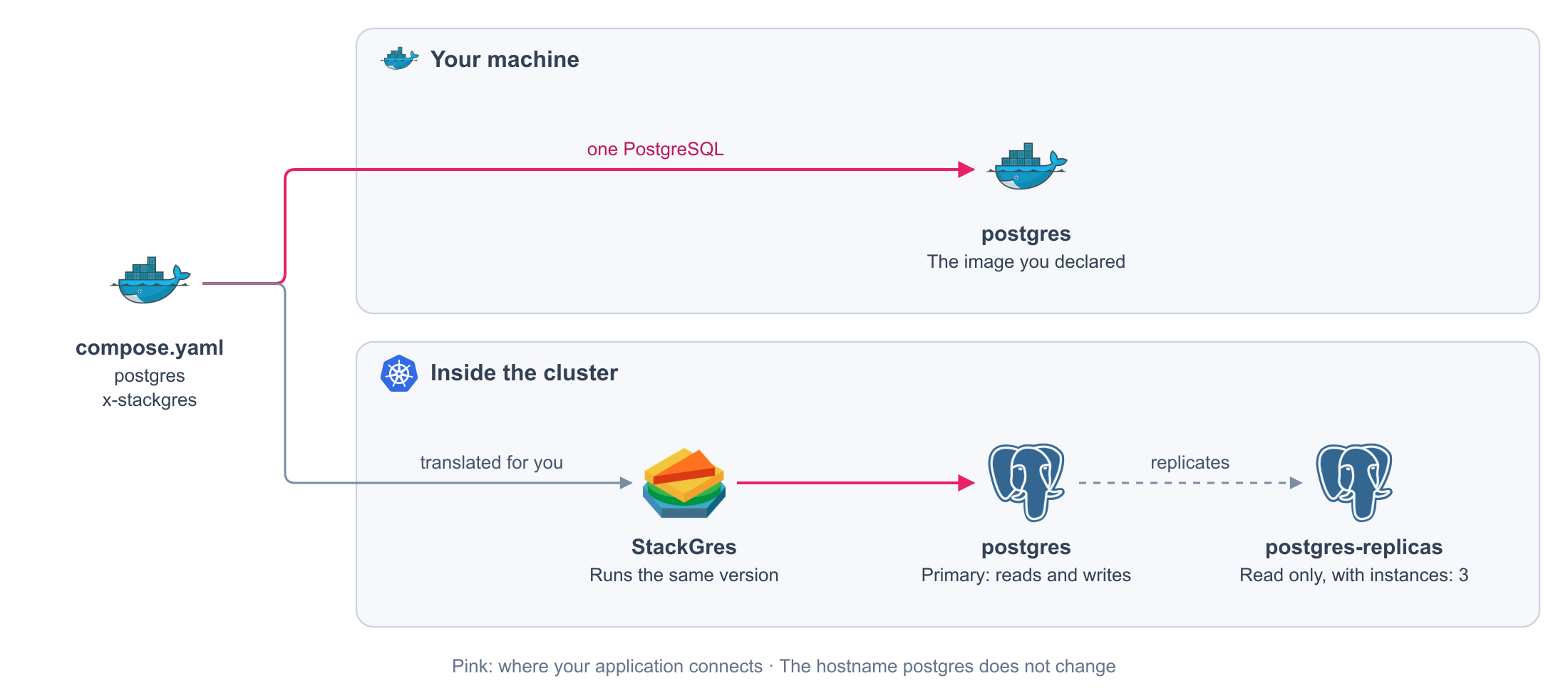
Keep the PostgreSQL you run on your machine. On the cluster, the platform runs it for you: same version, same databases, same hostname.
compose.yaml
services:
  postgres:
    image: pgvector/pgvector:pg16 # (1)!
    environment:
      POSTGRES_DB: app
      POSTGRES_USER: postgres
      POSTGRES_PASSWORD_FILE: /run/secrets/POSTGRES_PASSWORD # (2)!
    secrets:
      - POSTGRES_PASSWORD
      - APP_DB_PASSWORD
    volumes:
      - pgdata:/var/lib/postgresql/data # (3)!
    healthcheck:
      test: [CMD-SHELL, pg_isready -U postgres -d app]
      interval: 5s
    expose: ["5432"]
    deploy:
      resources:
        limits: # (4)!
          cpus: "1"
          memory: 1G
    x-stackgres: # (5)!
      databases:
        app:
          user: app # (6)!
          passwordSecret: APP_DB_PASSWORD # (7)!
          access: migrate # (8)!
          extensions: [pg_trgm, vector]

secrets:
  POSTGRES_PASSWORD:
    file: secrets/staging/postgres/POSTGRES_PASSWORD.txt
  APP_DB_PASSWORD:
    file: secrets/staging/postgres/APP_DB_PASSWORD.txt

volumes:
  pgdata:
    x-kubernetes:
      accessModes: [ReadWriteOnce]
      resources:
        requests:
          storage: 20Gi
- The version comes from the image.
postgresandpgvector/pgvectorare recognized. - The password of the administrator, as a secret.
- The disk, declared as any volume. Its size is the size of the database.
- CPU and memory limits are required for a database.
- Asks the platform to run PostgreSQL for you.
- The user that owns the database.
- Its password, a secret granted to this service.
- What the user may do:
runtime,migrate, orsuperuser.
Generated on every release. You never write these files or see them.
metadata:
  annotations:
    argocd.argoproj.io/sync-wave: '0'
  labels:
    com.docker.compose.project: my-app
    com.docker.compose.service: postgres
  name: postgres # (1)!
  namespace: my-app
spec:
  profile: production
  postgres:
    version: '16' # (2)!
    extensions:
    - name: pg_trgm
    - name: vector
  instances: 1 # (3)!
  replication:
    mode: async
  sgInstanceProfile: postgres # (4)!
  metadata:
    labels:
      clusterPods:
        com.docker.compose.project: my-app
        com.docker.compose.service: postgres
        com.docker.compose.network.default: 'true'
  pods:
    persistentVolume:
      size: 20Gi # (5)!
    disableConnectionPooling: true
  configurations:
    credentials:
      users:
        superuser:
          username:
            name: postgres-bootstrap
            key: username
          password:
            name: postgres-password # (6)!
            key: value
  managedSql:
    scripts:
    - id: 1
      sgScript: postgres-bootstrap # (7)!
apiVersion: stackgres.io/v1
kind: SGCluster
- The same hostname your services already use.
- Read from the image, not repeated by you.
- One PostgreSQL. See High availability.
- Your
deploy.resources. - The size of your volume.
- The administrator password, from the Secret of the cluster.
- Your
databases, turned into SQL.
The SQL that creates the user, the database, its permissions, and its extensions:
metadata:
  annotations:
    argocd.argoproj.io/sync-wave: '-4'
  labels:
    com.docker.compose.project: my-app
    com.docker.compose.service: postgres
  name: postgres-bootstrap
  namespace: my-app
spec:
  managedVersions: false
  continueOnError: false
  scripts:
  - name: role-app # (1)!
    id: 251247141
    version: 1747536522
    retryOnError: true
    scriptFrom:
      secretKeyRef:
        name: postgres-bootstrap
        key: app.sql
  - name: database-app
    id: 259060116
    version: 1
    script: CREATE DATABASE "app";
  - name: configure-app
    id: 1615423328
    version: 324597363
    database: app
    retryOnError: true
    script: 'CREATE EXTENSION IF NOT EXISTS "pg_trgm";

      CREATE EXTENSION IF NOT EXISTS "vector";

      REVOKE CONNECT ON DATABASE "app" FROM PUBLIC;

      GRANT CONNECT ON DATABASE "app" TO "app";

      GRANT USAGE, CREATE ON SCHEMA public TO "app";

      GRANT SELECT, INSERT, UPDATE, DELETE ON ALL TABLES IN SCHEMA public TO "app";

      GRANT USAGE, SELECT ON ALL SEQUENCES IN SCHEMA public TO "app";

      ALTER DEFAULT PRIVILEGES FOR ROLE "postgres" IN SCHEMA public GRANT SELECT,
      INSERT, UPDATE, DELETE ON TABLES TO "app";

      ALTER DEFAULT PRIVILEGES FOR ROLE "postgres" IN SCHEMA public GRANT USAGE, SELECT
      ON SEQUENCES TO "app";

      '
apiVersion: stackgres.io/v1
kind: SGScript
- The user, with its password taken from your secret. The password itself never appears here.
Fields
| Field | Required | Default | Values |
|---|---|---|---|
databases.<name>.user |
Yes | The user that owns the database. Lowercase letters, digits, and _ |
|
databases.<name>.passwordSecret |
Yes | A secret granted to the service | |
databases.<name>.access |
Yes | runtime: read and write rows. migrate: also create tables. superuser: the administrator only |
|
databases.<name>.extensions |
No | PostgreSQL extensions, such as pg_trgm or vector |
|
version |
No | Read from the image | The PostgreSQL version, when the image does not say it |
instances |
No | 1 |
Copies of PostgreSQL. One is the primary; the rest are replicas |
replication.mode |
No | async |
async, sync, strict-sync, sync-all, strict-sync-all |
replication.syncInstances |
No | 1 |
Replicas that confirm each write, with sync or strict-sync |
profile |
No | production |
production, testing, development |
Any other field in x-stackgres is an error.
What you get
On your machine
| Behavior | Detail |
|---|---|
| The image you declared | One PostgreSQL, with your scripts in /docker-entrypoint-initdb.d/ if you have them |
| Your secrets as files | POSTGRES_PASSWORD_FILE and the passwords of your databases |
On the cluster
| Behavior | Detail |
|---|---|
| The same version | Read from the image: pgvector/pgvector:pg16 runs PostgreSQL 16 |
| The same hostname | Your services keep connecting to postgres:5432 |
| Your databases | Users, databases, permissions, and extensions are created from databases, not from your scripts |
| Your disk | The size and class of your volume |
| Migrations wait | A lifecycle hook runs only when the databases exist |
| Passwords rotate | Change a secret, and the user gets the new password |
Rules
| Rule | Detail |
|---|---|
| The image says the version | postgres and pgvector/pgvector are read. For another image, declare version |
version agrees with the image |
A version that contradicts the image is rejected |
| One disk | Exactly one writable volume, mounted at the data directory |
| Limits are required | deploy.resources.limits with cpus and memory |
| Only the standard settings | environment holds POSTGRES_USER, POSTGRES_DB, POSTGRES_PASSWORD_FILE, and PGDATA, nothing else |
| The administrator is the only superuser | access: superuser is for the user of POSTGRES_USER |
| One password per user | Two databases of the same user share the secret |
| Internal only | No ports and no x-ingress. Other services reach it at postgres:5432 |
| Copies are instances | deploy.replicas on the database is rejected. Use instances |
| Synchronous needs company | sync and strict-sync need at least two instances |
Next
| To | Read |
|---|---|
| Run a primary with replicas | High availability |
| Back it up, or start from a backup | Backups |
| Run Redis, OpenSearch, or any service that owns its data | Stateful services |