Scheduled jobs
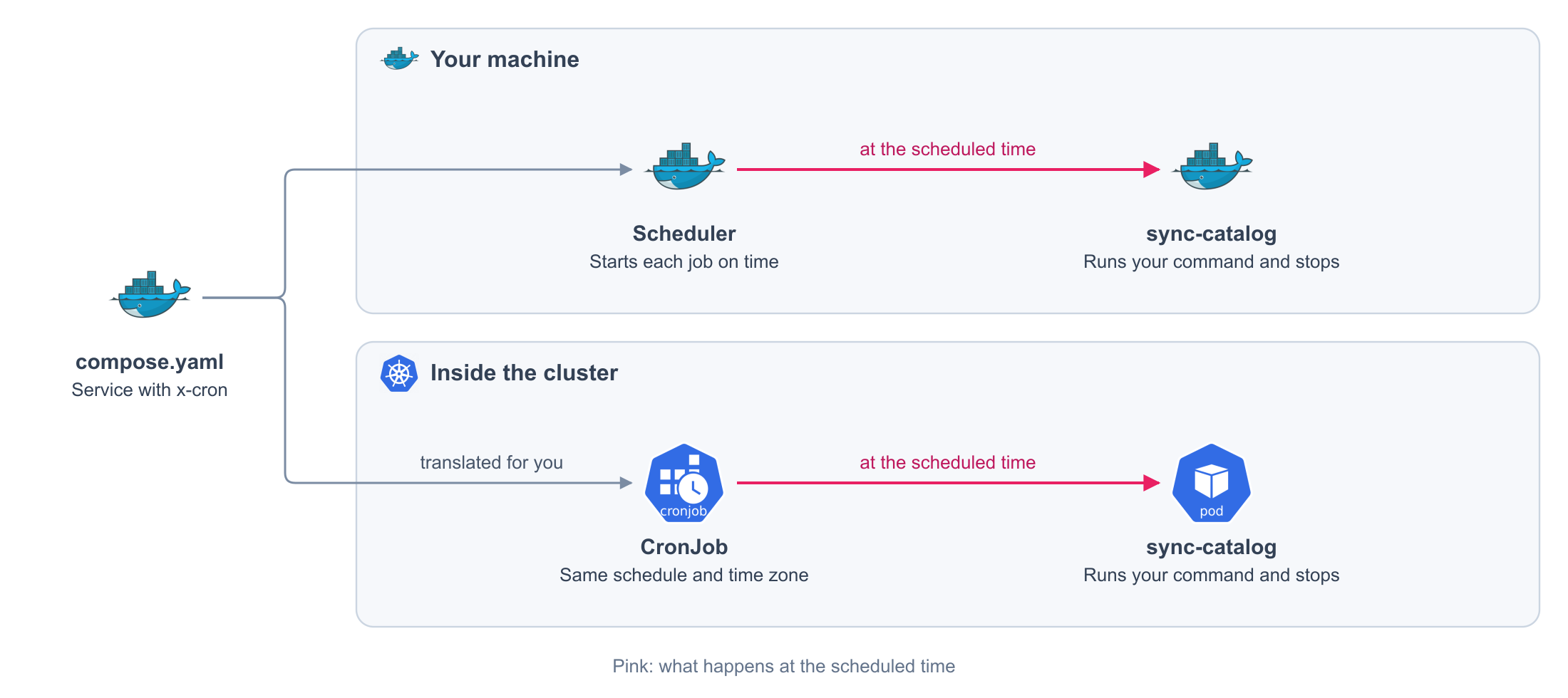
Add a schedule to a Compose service. Its container starts on time, runs your command, and stops.
services:
  sync-catalog:
    image: my-app:local
    command: [python, manage.py, sync_catalog] # (1)!
    x-cron:
      schedule: "0 3 * * *" # (2)!
      timeZone: Etc/UTC
- A command that ends. The run finishes when it exits.
- Every day at 03:00.
Generated on every release. You never write this file or see it.
apiVersion: batch/v1
kind: CronJob
metadata:
  labels:
    com.docker.compose.project: my-app
    com.docker.compose.service: sync-catalog
  name: sync-catalog
  namespace: my-app
spec:
  concurrencyPolicy: Forbid # (1)!
  jobTemplate:
    spec:
      backoffLimit: 0 # (2)!
      template:
        metadata:
          labels:
            com.docker.compose.project: my-app
            com.docker.compose.service: sync-catalog
            com.docker.compose.network.default: 'true'
        spec:
          containers:
          - args:
            - python
            - manage.py
            - sync_catalog
            image: my-app:local
            imagePullPolicy: IfNotPresent
            name: sync-catalog
          restartPolicy: Never # (3)!
  schedule: 0 3 * * * # (4)!
  suspend: false # (5)!
  timeZone: Etc/UTC # (6)!
- One run at a time.
- No retries. A failed run waits for the next scheduled time.
- When the command ends, the container is not started again.
- Your
schedule. truewhen you pause the job.- Your
timeZone.
The rest of the service is the Compose you already write: image, command, environment, volumes, and dependencies. You do not repeat it anywhere else.
Fields
| Field | Required | Default | Values |
|---|---|---|---|
schedule |
Yes | Five cron fields. See Schedule syntax | |
timeZone |
No | Etc/UTC |
An IANA time zone, the same for every job in the project |
concurrencyPolicy |
No | Forbid |
Forbid |
suspend |
No | false |
true, false |
Any other field is an error.
Schedule syntax
┌ minute    0-59
│ ┌ hour    0-23
│ │ ┌ day   1-31
│ │ │ ┌ month    1-12
│ │ │ │ ┌ weekday  0-6, Sunday is 0
* * * * *
| Form | Example | Runs |
|---|---|---|
| Any value | * * * * * |
Every minute |
| Number | 30 * * * * |
At minute 30 of every hour |
| List | 0,30 * * * * |
At minutes 0 and 30 of every hour |
| Range | 0 9-17 * * * |
Every hour from 09:00 to 17:00 |
| Step | */15 * * * * |
Every 15 minutes |
| Combined | 0,30 3-5 * * 1-5 |
At minutes 0 and 30, from 03:00 to 05:30, Monday to Friday |
Names such as MON and shortcuts such as @daily are not accepted.
What you get
On your machine
A scheduler, Ofelia, joins your stack and starts each job at its time. It starts after the services your jobs depend on.
| Behavior | Detail |
|---|---|
| Starts on schedule | The container is created with the stack and stays stopped until its time |
| Stops when done | It ends with the exit code of your command |
| One run at a time | A run does not start while the previous one is still going |
| No retries | A failed run waits for the next scheduled time |
| No catch-up | Times missed while the stack was down are not run later |
| Same container | The stopped container is reused by the next run, with the files it wrote |
On the cluster
The same declaration becomes a Kubernetes CronJob with your schedule and time zone, one run at a time and no retries. You write no manifest.
Rules
| Rule | Detail |
|---|---|
| A job is not restarted | Omit restart, or set it to no |
| A job has one instance | Omit deploy.replicas and scale, or set them to 1 |
| A job does not wait for another job | depends_on between two scheduled services is rejected |
| A service does not wait for a job | depends_on from a permanent service to a scheduled one is rejected |
scheduler is a reserved name |
No service of yours can use it once the project has a job |
A declaration that breaks a rule is rejected. It never turns into a permanent service.
Pause a job
services:
  sync-catalog:
    # ...
    x-cron:
      schedule: "0 3 * * *"
      suspend: true # (1)!
- The job keeps its declaration and is not scheduled. A run in progress is not cancelled.
To pause it in one environment only, set the field in that environment's file:
services:
  sync-catalog:
    x-cron:
      suspend: true