Secrets
Secrets stay encrypted in your repository. You edit them with one command.
| Kind | Path | Read by |
|---|---|---|
| Application | secrets/<environment>/ |
Your application |
| CI | secrets/*.env |
GitHub Actions |
| Promotion | secrets/platform/*.yaml |
Kargo, to read your private images |
Create or edit a secret
make secrets FILE=<path> # (1)!
- Opens your editor. The file is encrypted when you save.
make secrets FILE=secrets/staging/web/DB_PASSWORD.txt
One file for each value. Write only the value, without NAME=.
make secrets FILE=secrets/dockerhub.env
DOCKERHUB_USERNAME=…
DOCKERHUB_TOKEN=…
make secrets FILE=secrets/platform/dockerhub.yaml
apiVersion: isindir.github.com/v1alpha3
kind: SopsSecret
metadata:
  name: dockerhub
  namespace: my-app
spec:
  secretTemplates:
    - name: dockerhub
      labels:
        kargo.akuity.io/cred-type: image # (1)!
      stringData:
        repoURL: docker.io/<namespace>/my-app
        username: …
        password: …
- Tells Kargo this credential is for an image repository.
Use it in your application
Public settings go in environment. Each credential is an encrypted file that your service reads
from /run/secrets/.
services:
  web:
    environment:
      DB_HOST: postgres # (1)!
      DB_USER: web
    secrets:
      - source: web-db-password # (2)!
        target: DB_PASSWORD # (3)!

secrets:
  web-db-password:
    file: secrets/staging/web/DB_PASSWORD.txt # (4)!
- Public values stay in
environment. - The secret this service may read.
- The name of the file inside
/run/secrets/. - One encrypted file for each value, in the folder of its environment.
Generated on every release. You never write these files or see them.
apiVersion: apps/v1
kind: Deployment
metadata:
  labels:
    com.docker.compose.project: my-app
    com.docker.compose.service: web
  name: web
  namespace: my-app
spec:
  replicas: 1
  selector:
    matchLabels:
      com.docker.compose.project: my-app
      com.docker.compose.service: web
  strategy:
    type: Recreate
  template:
    metadata:
      labels:
        com.docker.compose.project: my-app
        com.docker.compose.service: web
        com.docker.compose.network.default: 'true'
    spec:
      containers:
      - env: # (1)!
        - name: DB_HOST
          value: postgres
        - name: DB_USER
          value: web
        image: my-app:local
        imagePullPolicy: IfNotPresent
        name: web
        volumeMounts:
        - mountPath: /run/secrets # (2)!
          name: app-secrets
          readOnly: true
      volumes:
      - name: app-secrets
        projected:
          sources:
          - secret:
              items:
              - key: value
                mode: 292 # (3)!
                path: DB_PASSWORD # (4)!
              name: web-db-password
- Your
environment: the public settings. - Where the service reads its secrets. Read only.
0444: the file is read only.- Your
target: the name of the file.
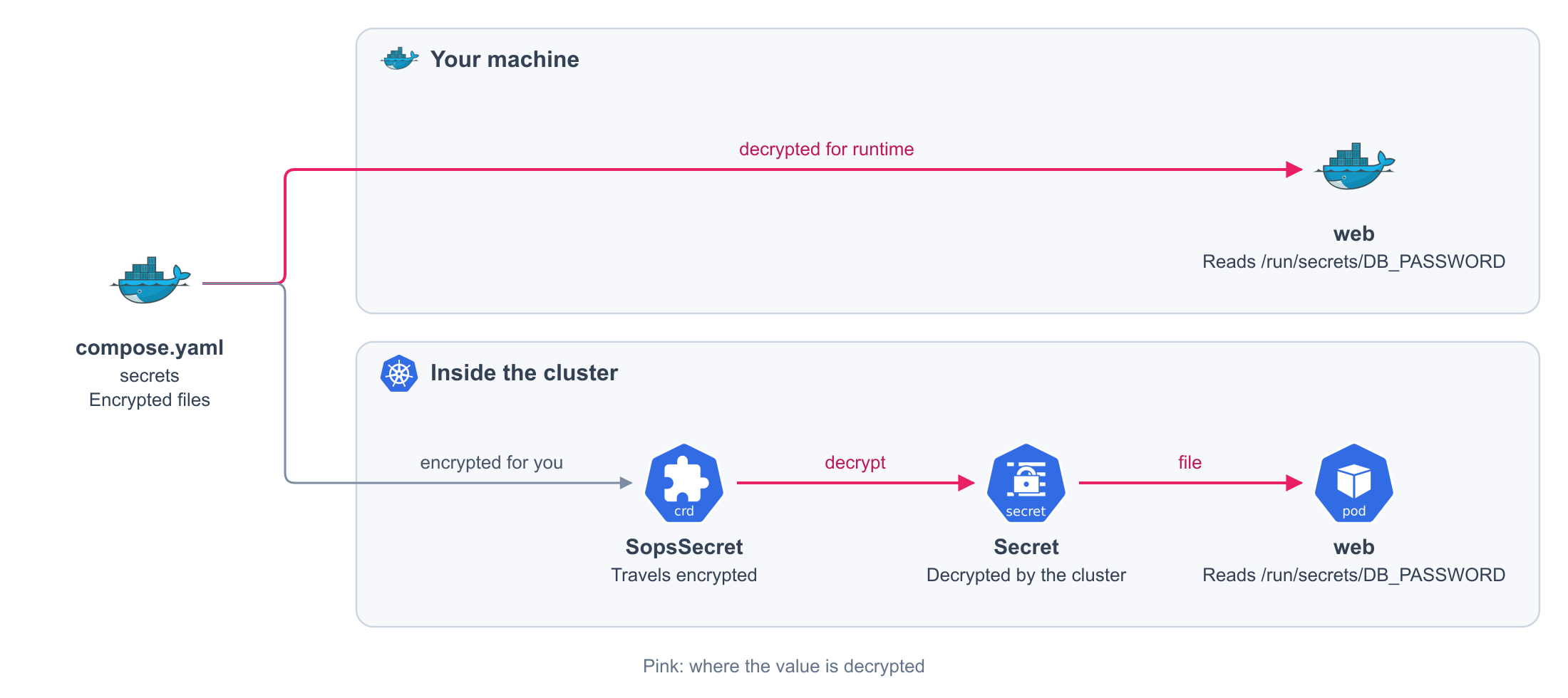
The value travels encrypted. The cluster decrypts it before your service starts.
apiVersion: isindir.github.com/v1alpha3
kind: SopsSecret
metadata:
    name: compose-secrets
    namespace: my-app
    annotations:
        argocd.argoproj.io/sync-wave: "-5" # (1)!
spec:
    secretTemplates:
        - data:
            value: ENC[...] # (2)!
          name: web-db-password
          type: Opaque
# sops: encryption metadata, left out here
- Created before your services.
- Encrypted in the release. The cluster decrypts it before your service starts.
Read the file
Only the file in your repository is encrypted. Inside the container, the file in /run/secrets/
holds the value, already decrypted.
Read it like any other file, in any language. Your editor may leave a line break at the end: trim it when you read.
from pydantic_settings import BaseSettings, SettingsConfigDict


class Settings(BaseSettings):
    model_config = SettingsConfigDict(secrets_dir="/run/secrets")

    db_host: str = "localhost"  # (1)!
    db_password: str  # (2)!
- Read from the variable
DB_HOST. - Read from the file
/run/secrets/DB_PASSWORD. Thetargetof the secret is the name of the setting, with its prefix if it has one.
| Behavior | Detail |
|---|---|
| The environment wins | A variable with the same name takes priority over the file |
| A missing secret stops the start | A required setting with no variable and no file fails validation |
import { readFileSync } from "node:fs";

const dbHost = process.env.DB_HOST ?? "localhost";
const dbPassword = readFileSync("/run/secrets/DB_PASSWORD", "utf8").trim();
import { readFileSync } from "node:fs";

function secret(name: string): string {
  return readFileSync(`/run/secrets/${name}`, "utf8").trim();
}

export const settings = {
  dbHost: process.env.DB_HOST ?? "localhost",
  dbPassword: secret("DB_PASSWORD"),
};
package main

import (
    "os"
    "strings"
)

func dbPassword() (string, error) {
    value, err := os.ReadFile("/run/secrets/DB_PASSWORD")
    return strings.TrimSpace(string(value)), err
}
What you get
On your machine
| Behavior | Detail |
|---|---|
| Encrypted source files | The launcher decrypts them for runtime use; Docker receives the plaintext values |
| Out of the environment | The value is a file. It is not among the variables of the container |
| One service, its secrets | A service reads only the secrets it declares |
| Rotation restarts the readers | Changing a file recreates the services that read it, and no other |
| Quiet errors | An error names the secret and never prints its value |
On the cluster
The same declaration delivers each file encrypted, and your service reads it at the same path. You write no manifest.
Rules
| Rule | Detail |
|---|---|
| A secret comes from a file | file is required. external and environment sources are rejected |
| The file is encrypted | A plaintext file is rejected |
| The file has a value | An empty secret is rejected. Remove it from the service if it is unused |
env_file is not accepted |
Use environment for public values and secrets for credentials |
| The service can write to its filesystem | A service with read_only: true cannot read secrets |
Restart when a secret changes
services:
  web:
    x-reloader: true # (1)!
- On the cluster, the service restarts when a secret it reads changes. On your machine, the next start already reads the new value.
Generated on every release. You never write this file or see it. The rest of the file is the same as before.
apiVersion: apps/v1
kind: Deployment
metadata:
  annotations:
    reloader.stakater.com/auto: 'true' # (1)!
  labels:
    com.docker.compose.project: my-app
    com.docker.compose.service: web
  name: web
  namespace: my-app
- The platform restarts the service when a Secret or a config it reads changes.
Rotate a credential
- Create the new credential at the provider.
make secrets FILE=<path>and replace the value.- Commit and push.
- Revoke the old credential.
Never commit age.key
Keep a copy somewhere safe. Without it, your encrypted files cannot be read.