Volumes and backups
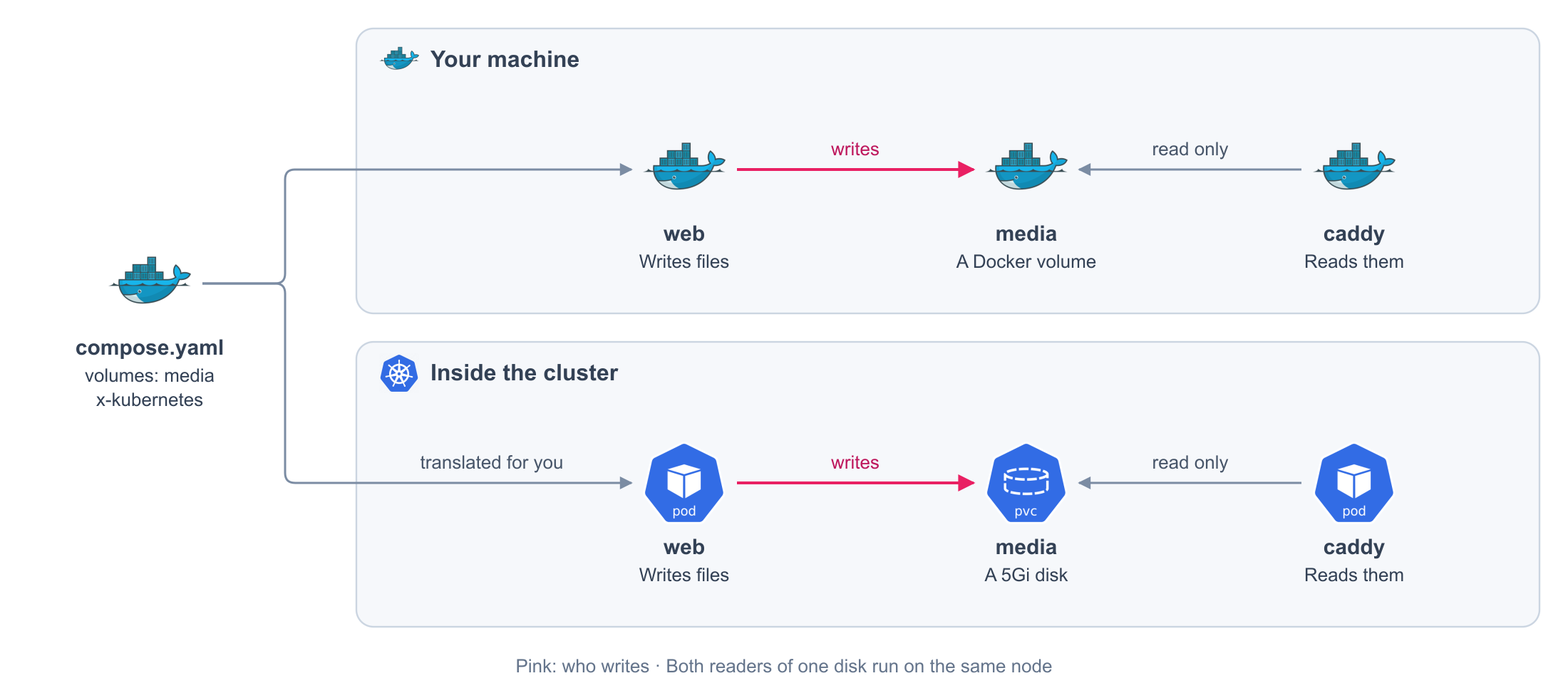
Keep the files a service writes. Declare a volume, say how big it is, and mount it where the service expects it.
services:
  web:
    image: my-app:local
    volumes:
      - media:/app/media # (1)!
  caddy:
    image: caddy:2
    volumes:
      - media:/srv/media:ro # (2)!

volumes:
  media:
    x-kubernetes: # (3)!
      accessModes: [ReadWriteOnce]
      resources:
        requests:
          storage: 5Gi
- The volume, and where this service sees it.
- The same volume, read only for this service.
- How big the disk is, and how it is shared.
Generated on every release. You never write these files or see them.
apiVersion: v1
kind: PersistentVolumeClaim
metadata:
  labels:
    com.docker.compose.project: my-app
  name: media
  namespace: my-app
spec:
  accessModes:
  - ReadWriteOnce # (1)!
  resources:
    requests:
      storage: 5Gi # (2)!
- Your
accessModes. - Your
storage.
Both readers of one disk run on the same node.
apiVersion: apps/v1
kind: Deployment
metadata:
  labels:
    com.docker.compose.project: my-app
    com.docker.compose.service: web
  name: web
  namespace: my-app
spec:
  replicas: 1
  selector:
    matchLabels:
      com.docker.compose.project: my-app
      com.docker.compose.service: web
  strategy:
    type: Recreate
  template:
    metadata:
      labels:
        com.docker.compose.project: my-app
        com.docker.compose.service: web
        com.docker.compose.network.default: 'true'
    spec:
      affinity: # (1)!
        podAffinity:
          requiredDuringSchedulingIgnoredDuringExecution:
          - labelSelector:
              matchExpressions:
              - key: com.docker.compose.service
                operator: In
                values:
                - caddy
                - web
              matchLabels:
                com.docker.compose.project: my-app
            namespaces:
            - my-app
            topologyKey: kubernetes.io/hostname
      containers:
      - image: my-app:local
        imagePullPolicy: IfNotPresent
        name: web
        volumeMounts:
        - mountPath: /app/media # (2)!
          name: volume-0
          readOnly: false
      volumes:
      - name: volume-0
        persistentVolumeClaim:
          claimName: media # (3)!
          readOnly: false
- The services that share the disk run on the same node.
- Your mount.
- The disk.
Fields
| Field | Required | Default | Values |
|---|---|---|---|
volumes[] |
<name>:<path> or <name>:<path>:ro, in Compose syntax |
||
volumes[].volume.subpath |
No | A directory inside the volume to mount instead of its root | |
volumes[].volume.nocopy |
No | false |
true keeps an empty volume empty on your machine |
x-kubernetes.accessModes |
Yes | One of ReadWriteOnce, ReadWriteMany, ReadOnlyMany, ReadWriteOncePod |
|
x-kubernetes.resources.requests.storage |
Yes | The size of the disk, such as 5Gi |
|
x-kubernetes.storageClassName |
No | The default of the cluster | The kind of storage the cluster offers |
Any other field in x-kubernetes is an error.
What you get
On your machine
| Behavior | Detail |
|---|---|
| A Docker volume | Docker creates it the first time, and keeps it between restarts |
| Shared | Every service that names it sees the same files |
| Files of the image | If the volume is empty, Docker copies into it what the image had at that path |
On the cluster
| Behavior | Detail |
|---|---|
| A disk of the size you asked | The cluster provides it; you write no manifest |
| Shared | Every service that names it mounts the same disk, read only where you said so |
| Same node | With ReadWriteOnce, the services that share the disk run on the same node |
| An empty disk stays empty | Nothing is copied from the image. Declare nocopy: true so your machine behaves the same, or fill the disk from your application |
Back it up
volumes:
  media:
    x-kubernetes:
      accessModes: [ReadWriteOnce]
      resources:
        requests:
          storage: 5Gi
    x-velero:
      backup: true # (1)!
- The files of this volume enter the backups of the platform. When they run, how long they are kept, and where they go belong to the platform.
Generated on every release. You never write this file or see it. In the Deployment of every service that mounts the volume, the copies carry a mark:
  template:
    metadata:
      annotations:
        backup.velero.io/backup-volumes: volume-0 # (1)!
      labels:
        com.docker.compose.project: my-app
        com.docker.compose.service: web
        com.docker.compose.network.default: 'true'
- The backup of the platform copies this volume from the running service.
Restore it
Start a volume from a backup. It fills before the services that mount it start.
volumes:
  media:
    x-kubernetes:
      accessModes: [ReadWriteOnce]
      resources:
        requests:
          storage: 5Gi
    x-velero:
      backup: true
      restore:
        backupName: my-app-media-20260929 # (1)!
        includedNamespaces: [my-app] # (2)!
- A backup of the platform. Its name belongs to one environment, so declare it in that environment's file.
- Where that backup was taken.
Generated on every release. You never write this file or see it.
apiVersion: velero.io/v1
kind: Restore
metadata:
  annotations:
    argocd.argoproj.io/sync-wave: '-6' # (1)!
    argocd.argoproj.io/sync-options: Prune=false,Delete=false
  name: volume-2acd63995aef
  namespace: velero
spec:
  backupName: my-app-media-20260929
  existingResourcePolicy: none
  includeClusterResources: false
  includedNamespaces:
  - my-app
  includedResources: # (2)!
  - pods
  - persistentvolumeclaims
  - persistentvolumes
  namespaceMapping:
    my-app: my-app
  restorePVs: true
- Before everything else in the release.
- Only the files: the services of the backup are not brought back.
| Behavior | Detail |
|---|---|
| Once | The restore fills the disk when it is created. Later releases keep the data |
| Only the files | Nothing else from the backup comes back |
| Before the services | The services that mount the volume start after the restore |
Let the process write to it
Some images run as a user that cannot write to a fresh disk. Give the disk to that user's group.
services:
  opensearch:
    image: opensearchproject/opensearch:2
    volumes:
      - search:/usr/share/opensearch/data
    deploy:
      x-kubernetes:
        securityContext:
          fsGroup: 1000 # (1)!
          fsGroupChangePolicy: OnRootMismatch # (2)!
- The group of the process inside the image. The disk is made writable for it.
- Only fix the permissions when the root of the disk does not match. Faster for big disks.
Generated on every release. You never write this file or see it. In the copies of the service:
      securityContext:
        fsGroup: 1000
        fsGroupChangePolicy: OnRootMismatch
      volumes:
      - name: volume-0
        persistentVolumeClaim:
          claimName: search
          readOnly: false
securityContext takes the fields of Kubernetes. On your machine it has no effect: Docker runs
the image with its own user.
Rules
| Rule | Detail |
|---|---|
| A volume has a name | Anonymous volumes, bind mounts, and tmpfs are rejected |
| A volume has a size and an access mode | x-kubernetes is required on every named volume |
| One access mode | accessModes holds exactly one value |
| A mount is a directory | <path> is absolute, and two mounts cannot share it |
| No drivers | driver other than local, driver_opts, external, and labels are rejected |