Releases and rollback
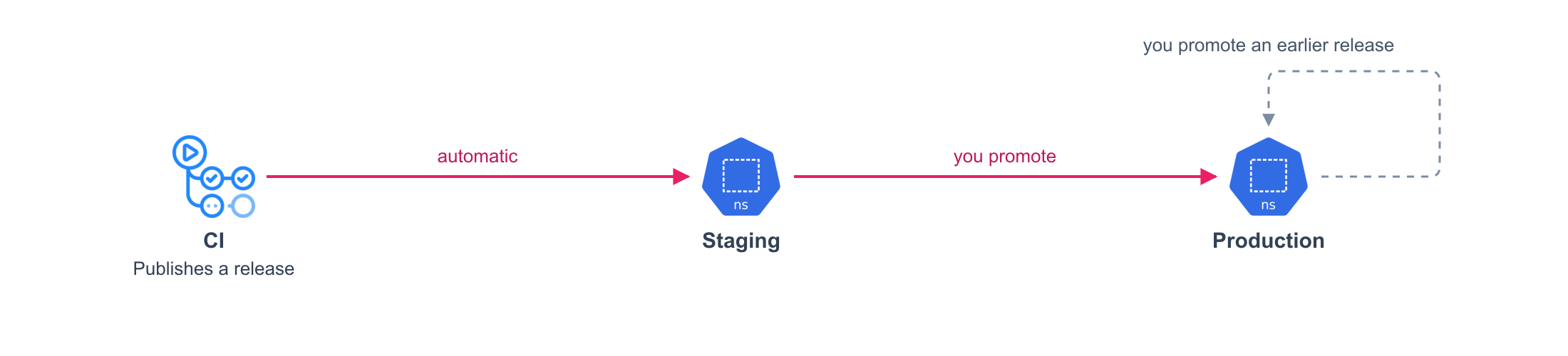
Promote to production
- Open your project in Kargo.
- On production, click the truck icon and choose Promote.
- Click Select on the release that staging runs.
- Review the image and the commit, then click Promote.
Roll back
- Open your project in Kargo.
- On production, click the truck icon and choose Promote.
- Click Select on an earlier release.
- Click Promote.
A rollback restores code and configuration, not data
Files and database contents stay as they are. See Data and backups.
Check it worked
The production box in Kargo shows the release name and Healthy.
Change who promotes
deploy/platform.yaml
environments:
  staging:
    path: deploy/staging
    promotion: automatic # (1)!
  production:
    path: deploy/production
    promotion: manual
    from: staging
automaticpromotes every new release.manualwaits for a person.
Roll out gradually
Declare the steps of a canary. The new version takes half of the copies, waits, then takes all of them.
compose.production.yaml
services:
  web:
    deploy:
      replicas: 4
      x-rollout:
        strategy:
          canary:
            steps:
              - setWeight: 50 # (1)!
              - pause:
                  duration: 2m # (2)!
              - setWeight: 100
- The share of the copies that run the new version. The steps use the syntax of Argo Rollouts.
- If the new version fails during the pause, the rollout stops and the old one keeps serving.
Generated on every release. You never write this file or see it. The rest of the file is the same as the Deployment of the service.
apiVersion: argoproj.io/v1alpha1
kind: Rollout # (1)!
metadata:
  labels:
    com.docker.compose.project: my-app
    com.docker.compose.service: web
  name: web
  namespace: my-app
spec:
  progressDeadlineAbort: true
  progressDeadlineSeconds: 600 # (2)!
  replicas: 4
  selector:
    matchLabels:
      com.docker.compose.project: my-app
      com.docker.compose.service: web
  strategy:
    canary:
      steps: # (3)!
      - setWeight: 50
      - pause:
          duration: 2m
      - setWeight: 100
- A Rollout in place of a Deployment.
- If the new version is not healthy after ten minutes, the rollout stops and goes back.
- Your steps.
A weight is a share of copies, not of requests. On your machine, x-rollout has no effect:
Docker starts the new version at once.