Health checks
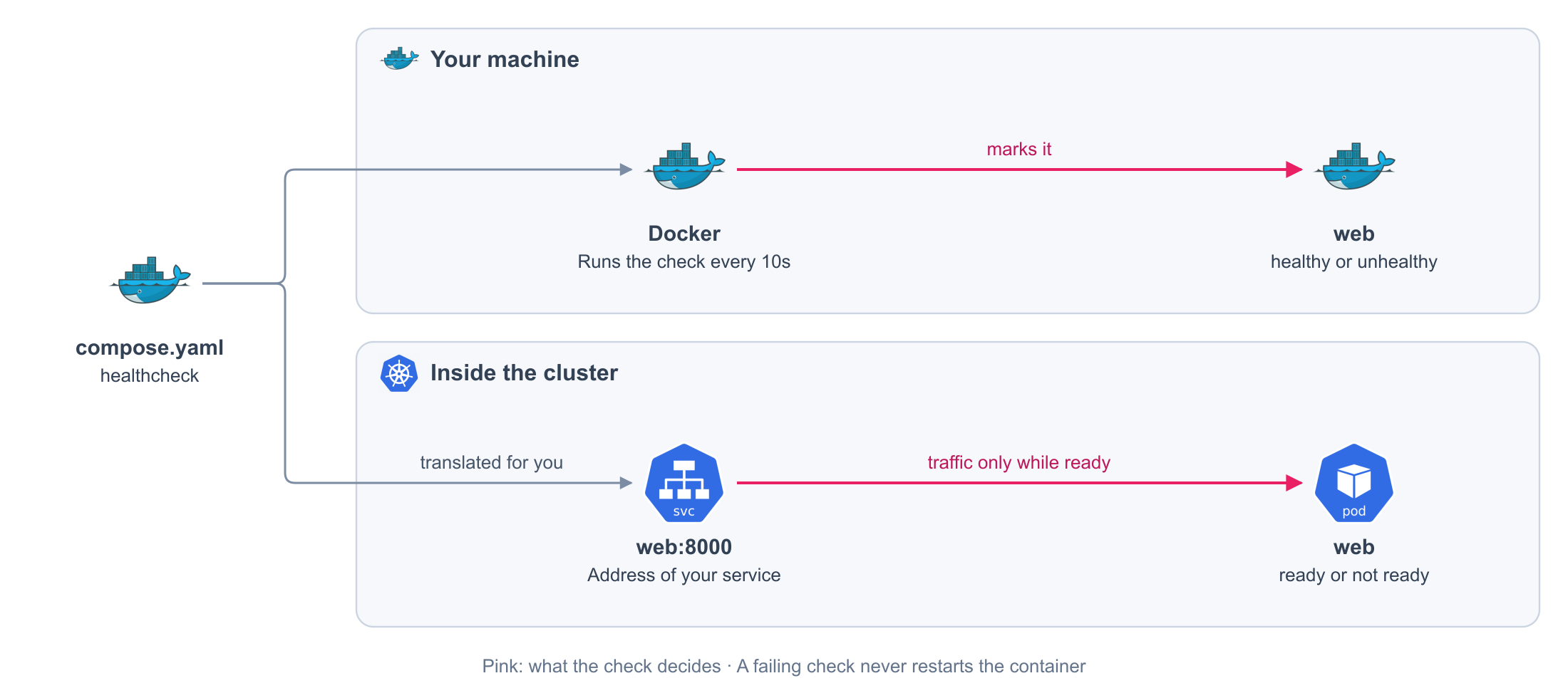
Tell the platform how to know that your service is ready. Until it is, no traffic reaches it.
compose.yaml
services:
  web:
    image: my-app:local
    healthcheck:
      test: [CMD, curl, --fail, http://localhost:8000/healthz] # (1)!
      interval: 10s # (2)!
      timeout: 5s
      retries: 5 # (3)!
      start_period: 30s # (4)!
- A command that exits with
0when the service is ready. It runs inside the container. - How often it runs.
- How many failures in a row make the service not ready.
- How long to wait after the start before the first check.
Generated on every release. You never write this file or see it.
apiVersion: apps/v1
kind: Deployment
metadata:
  labels:
    com.docker.compose.project: my-app
    com.docker.compose.service: web
  name: web
  namespace: my-app
spec:
  replicas: 1
  selector:
    matchLabels:
      com.docker.compose.project: my-app
      com.docker.compose.service: web
  strategy:
    type: Recreate
  template:
    metadata:
      labels:
        com.docker.compose.project: my-app
        com.docker.compose.service: web
        com.docker.compose.network.default: 'true'
    spec:
      containers:
      - image: my-app:local
        imagePullPolicy: IfNotPresent
        name: web
        readinessProbe: # (1)!
          exec: # (2)!
            command:
            - curl
            - --fail
            - http://localhost:8000/healthz
          failureThreshold: 5 # (3)!
          initialDelaySeconds: 30 # (4)!
          periodSeconds: 10 # (5)!
          successThreshold: 1 # (6)!
          timeoutSeconds: 5 # (7)!
- Ready or not ready. Never a restart.
- Your
test. - Your
retries. - Your
start_period. - Your
interval. - One pass, and it is ready again.
- Your
timeout.
Fields
| Field | Required | Default | Values |
|---|---|---|---|
test |
Yes | [CMD, ...] with a command and its arguments, or [CMD-SHELL, "..."] with one script. [NONE] turns the check off |
|
interval |
No | 30s |
A duration, such as 10s or 1m30s |
timeout |
No | 30s |
A duration |
retries |
No | 3 |
An integer |
start_period |
No | 0s |
A duration |
disable |
No | false |
true turns the check off |
Durations are rounded up to whole seconds.
What you get
On your machine
| Behavior | Detail |
|---|---|
| A status | Docker marks the container healthy or unhealthy |
| Others wait for it | A service with depends_on and condition: service_healthy starts when the check passes |
| No restart | An unhealthy container keeps running |
On the cluster
| Behavior | Detail |
|---|---|
| Traffic only while ready | The service receives requests while the check passes, and stops receiving them when it fails |
| No restart | A failing check never restarts the container |
| The first check waits | During start_period, the cluster does not run the check. Docker can report healthy before it ends |
Restart it when it hangs
The health check decides who receives traffic. Two more checks decide when a container is restarted, and how long a start may take. They only exist on the cluster.
compose.production.yaml
services:
  web:
    deploy:
      x-kubernetes:
        Probes:
          Startup: # (1)!
            httpGet: {path: /healthz, port: 8000}
            periodSeconds: 5
            failureThreshold: 36
          Liveness: # (2)!
            httpGet: {path: /healthz, port: 8000}
            periodSeconds: 15
            timeoutSeconds: 5
            failureThreshold: 5
- Up to 36 tries, every 5 seconds: three minutes to start before the other checks begin.
- Five failures in a row, and the container is restarted.
Generated on every release. You never write this file or see it.
apiVersion: apps/v1
kind: Deployment
metadata:
  labels:
    com.docker.compose.project: my-app
    com.docker.compose.service: web
  name: web
  namespace: my-app
spec:
  replicas: 1
  selector:
    matchLabels:
      com.docker.compose.project: my-app
      com.docker.compose.service: web
  strategy:
    type: Recreate
  template:
    metadata:
      labels:
        com.docker.compose.project: my-app
        com.docker.compose.service: web
        com.docker.compose.network.default: 'true'
    spec:
      containers:
      - image: my-app:local
        imagePullPolicy: IfNotPresent
        livenessProbe: # (1)!
          failureThreshold: 5
          httpGet:
            path: /healthz
            port: 8000
          periodSeconds: 15
          timeoutSeconds: 5
        name: web
        readinessProbe: # (2)!
          exec:
            command:
            - curl
            - --fail
            - http://localhost:8000/healthz
          failureThreshold: 3
          initialDelaySeconds: 0
          periodSeconds: 10
          successThreshold: 1
          timeoutSeconds: 30
        startupProbe: # (3)!
          failureThreshold: 36
          httpGet:
            path: /healthz
            port: 8000
          periodSeconds: 5
- Your
Liveness. When it fails, the container is restarted. - Your
healthcheck, as before. - Your
Startup. Until it passes, the other two wait.
| Field | What it does |
|---|---|
Probes.Readiness |
Replaces the healthcheck as the check for traffic |
Probes.Liveness |
Restarts the container when it fails |
Probes.Startup |
Runs first. The other checks wait until it passes |
Each check has exactly one action, httpGet, tcpSocket, exec, or grpc, and the timings
initialDelaySeconds, periodSeconds, timeoutSeconds, failureThreshold, and
successThreshold, with their Kubernetes names. On your machine they have no effect: Docker keeps
using healthcheck.
Rules
| Rule | Detail |
|---|---|
| The check is yours | test is required. The HEALTHCHECK of the image is not read |
| One script | CMD-SHELL takes exactly one script |
No start_interval |
It has no equivalent on the cluster and is rejected |
| One action per check | A probe with two actions, or none, is rejected |
| Liveness and Startup pass once | successThreshold other than 1 is rejected for them |
| Only permanent services | A scheduled job or a database cannot declare Probes |